Latest Version
Version 0.2.0 for macOS 13.0 or later.
Connected Apps Beta for macOS
See what is playing and control YouTube Music from the macOS menu bar without switching back to the browser.
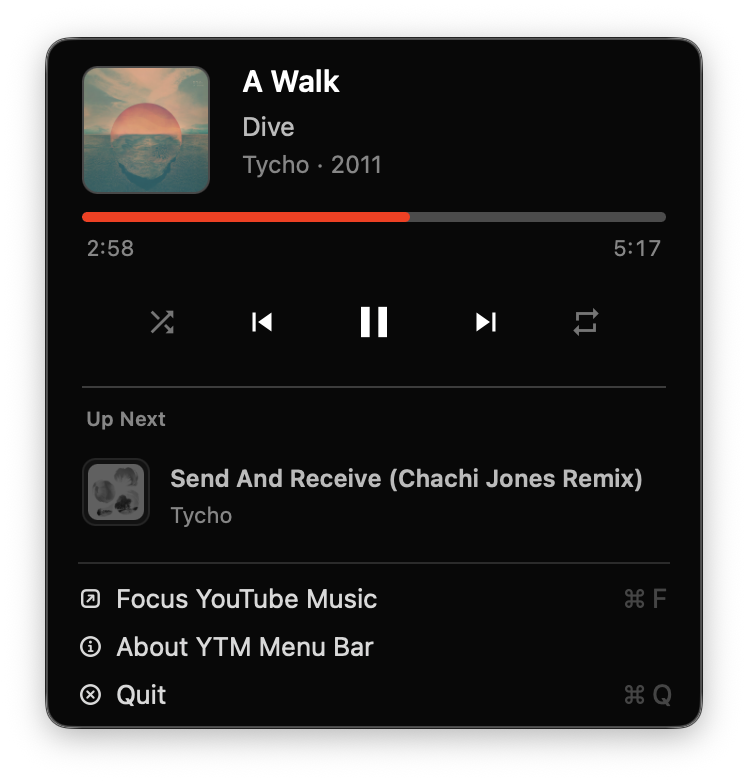
Version 0.2.0 for macOS 13.0 or later.
After installing, open YTM Enhancer, enable Connected Apps, then open YTM Menu Bar from macOS.
Works with YTM Enhancer in Chrome, Chromium, Microsoft Edge, and Firefox on macOS.
Install the app with Homebrew if you prefer package manager updates.
brew install --cask gormanity/tap/ytm-menu-bar
Direct installs update from the app. Homebrew installs update with
brew update && brew upgrade --cask ytm-menu-bar
Direct package installs include an uninstaller in Applications. Open it to remove the app, native messaging host, and package receipt. Homebrew installs uninstall through Homebrew.
/Applications/YTM Menu Bar Uninstaller.command
brew uninstall --cask ytm-menu-bar
YTM Menu Bar communicates locally with the YTM Enhancer extension. It does not read YouTube Music pages directly.
Releases are signed with Developer ID and notarized by Apple for distribution outside the Mac App Store.